self-taught
Docker is a platform for developing, shipping, and running applications in isolated environments called containers.
Containers are isolations of application processes, not virtual machines, so they have less overhead.
Docker Architecture
Docker uses a client-server architecture:
- Docker client: command line interface for interacting with Docker
- docker host: runs the docker daemon (
dockerd) - docker daemon: manages docker objects (images, containers, networks, volumes)
- docker registry: stores docker images (docker hub os the default public registry)
Docker objects
-
image: read only templates with instructions for creating containers
-
container: the image when it is
running: runnable instance of an image -
engine: the software that executes commands for containers, can be clustered together
-
registry: stores distributes and manages docker images
-
control plane: management plane for container and cluster orchestration
-
volumes: persistent data storage outside containers
-
networks: communication channels between containers
-
dockerfile: script with instructions to build an image
Cheatsheet
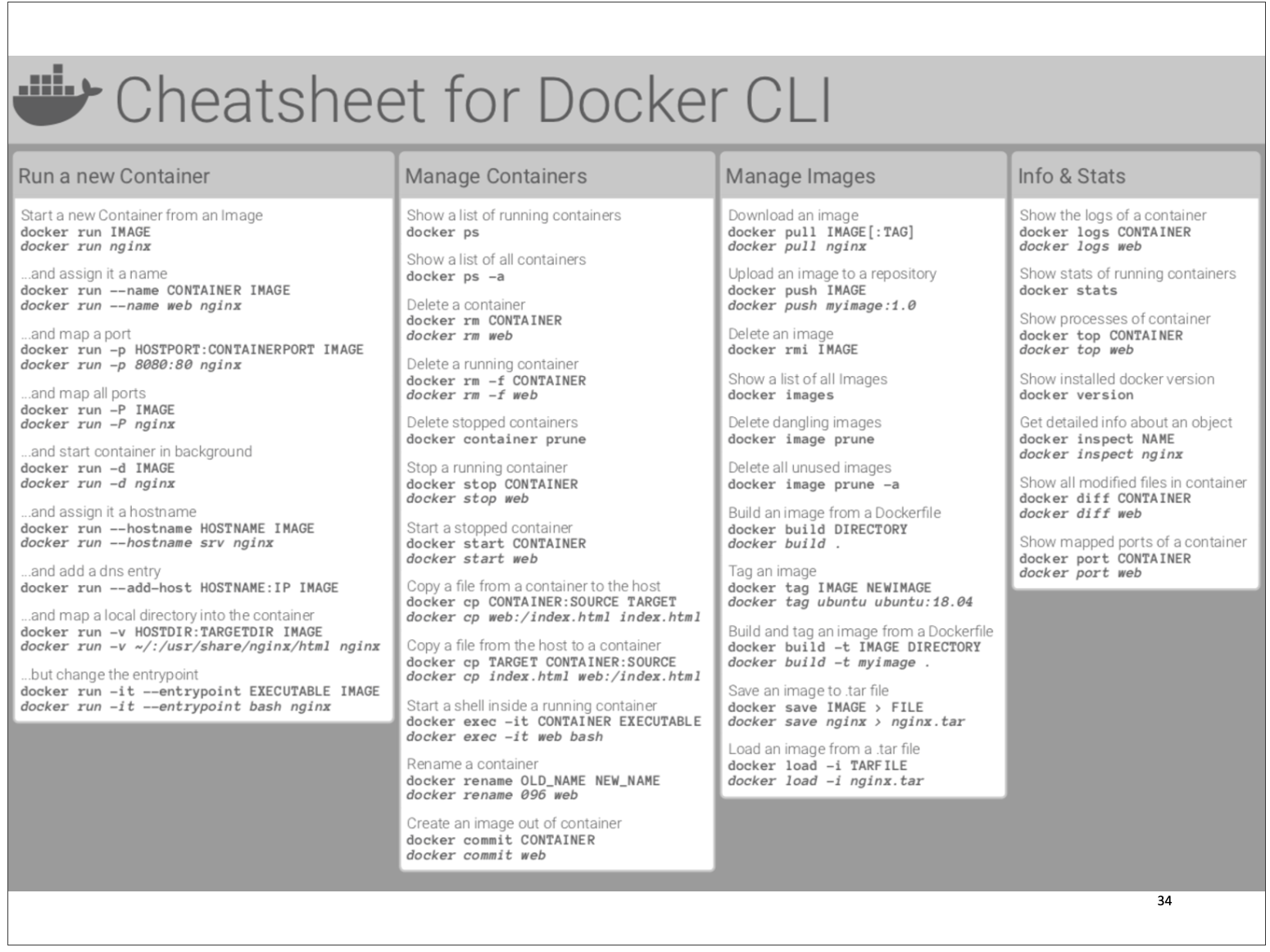
Commands
docker pull [OPTIONS] NAME[:TAG|@DIGEST]

docker build [OPTIONS] PATH | URL | -

docker start [OPTIONS] CONTAINER [CONTAINER...]
	# start one or more stopped containers
	-ai # interactive, attach stdout/stderr

docker run [OPTIONS] IMAGE [COMMAND] [ARG..]
	-d # run in detached mode (background)
	-p 8080:5000 # map host port 8080 to container port 5000
	-v $(pwd)/data:/app/data # mount a volume
	-e DEBUG=true # set enviroment variables
	--name NOME # give the container a name
	--rm # remove the container when it exits

docker top CONTAINER_NAME
docker logs CONTAINER_NAME
	-f # continues following the output of logs

docker rm CONTAINER_NAME
docker container prune # removes every stopped container
Container Communication
Container networking let containers to connect to and communicate with each other, or to non-Docker workloads.
Containers have networking enabled by default, and they can make outgoing connections.
A container has no information about what kind of network it’s attached to, or whether their peers are also Docker workloads or not.
A container only sees a network interface with an IP address, a gateway, a routing table, DNS services, and other networking details.
To make a container accessible to other containers, we can enable inter-container communication by connecting the containers to the same network.
Docker Networks
- bridge: default network for containers on the same hosts
- host: use host’s networking directly
- overlay: for containers across multiple docker hosts
- macvlan: assign a MAC address to containers
# Create a network
docker network create mynetwork
# Run container on network
docker run --network=mynetwork myapp:latest
# List networks
docker network ls
# Inspect network
docker network inspect mynetwork
Docker Image
Docker images are built from a Dockerfile and a “context”.
A build’s context is the set of files located in the specified PATH or URL. The build process can refer to any of the files in the context.
The URL parameter can refer to three kinds of resources: Git repositories, pre-packaged tarball contexts, and plain text files.
docker image build [OPTIONS] PATH | URL | -
	# -t: tag
	# PATH: Context path
Dockerfile
# Use an official Python runtime as a parent image
FROM python:3.12-slim
# Set the working directory
WORKDIR /app
# Copy requirements and install dependencies
COPY requirements.txt .
	# source, WORKDIR/dest
RUN pip install --no-cache-dir -r requirements.txt
# Copy the current directory contents
COPY . .
# Make port 5000 available
EXPOSE 5000
# Define environment variable
ENV NAME World
# Run app.py when the container launches
CMD ["python", "app.py"]
Directives
- FROM: this sets the base image for the subsequent instructions, this must be the first instruction
- WORKDIR: sets the workind directory for subsequent RUN, CMD, ENTRYPOINT, COPY, ADD commands during the build
- COPY: used to copy files and directories from the host system to the image during build
- RUN: used to run commands to the image during build time
- ADD: similar to copy but it can also copy from URLs and automatically unpack compressed archives
- EXPOSE: indicates the ports on which the container will listen for connections. This instruction doesn’t publish the port, it is just documentation
- ENTRYPOINT: allows to configure a container that will run as an executable:
ENTRYPOINT["executable","param1",...] - CMD: can be used to pass additional arguments to ENTRYPOINT. Will be overridden by arguments passed to
docker run. - ENV: used to set enviroment variables for specfic service of container. Allows for multiple
<key>=<value>pairs - VOLUME: creates a mount point with the specified name and marks it as holding externally mounted volumes from native host or other containers:
VOLUME ["/data"] .dockerignorefile: used to exclude files or folders to not include in the docker build.
Data Persistance
Methods to make data persistent even after deleting its container.
Bind mounts
A file or directory on the host machines gets mounted into a container.
docker run --mount type=bind, src=path, dst=path ...Volumes
When using a volume a new directory is created within docker’s storage directory on the host machine and docker manages the directory’s contents.
- These are easier to back up or migrate than bind mounts.
- easily shared among containers
- volumes drivers let you store volumes on remote hosts or cloud providers, encrypt the contents or add functionality
docker volume create my-volume

docker run -v /hostpath:/containerpath[:ro] ...
	# mounts hostpath to containerpath
	# [:ro]: read onlydo
Docker Compose
With compose you can create a YAML file to define the services and with a single command, can spin everything up or tear it all down.
Each of the containers is run in isolation but can interact with each other when required. Docker Compose defines a multi-container application in a single file.
Structure of a docker-compose.yaml file:
- version
- services
- build
- image
- enviroment
- ports
- volumes
- networks
example:
version: "3.7"
services:
	app:
		image: node:12-alpine
		command: sh -c "yarn install && yarn run dev”
		ports:
			- 3000:3000
		working_dir: /app
		volumes:
			- ./:/app
		environment:
			MYSQL_HOST: mysql
			MYSQL_USER: root
			MYSQL_PASSWORD: secret
			MYSQL_DB: todos
	mysql:
		image: mysql:5.7
		volumes:
		- mysql-data:/var/lib/mysql
			environment:
			MYSQL_ROOT_PASSWORD: secret
			MYSQL_DATABASE: todos
volumes:
mysql-data:
services:
web:
build: .
depends_on:
-db
-redis
redis:
image: redis
db:
image: postgresCommands
# Start services defined in docker-compose.yml
docker-compose up
# Run in detached mode
docker-compose up -d
# Stop services
docker-compose down
# Stop services and remove volumes
docker-compose down -v
# View logs
docker-compose logs
# Execute command in a service container
docker-compose exec web python manage.py migrate

dcoker-compose stop # does not remove the containers
docker-compose start # containers need to have already been made

docker-compose ps

---

build Build or rebuild services
help Get help on a command
kill Kill containers
logs View output from containers
port Print the public port for a port binding
ps List containers
pull Pulls service images
rm Remove stopped containers
run Run a one-off command
scale Set number of containers for a service
start Start services
stop Stop services
restart Restart services
up Create and start containers
Docker Security
- Scan images for vulnerabilities (docker scan)
docker scout quickview/cves/sbom
- Use minimal base images (alpine, slim)
- Don’t run containers as root
- Limit container capabilities
- Use read-only filesystems where possible
- Sign images with Docker Content Trust
- Apply resource limits
- Use security scanning tools (Trivy, Clair)
- Keep Docker engine and images updated
- Implement proper network segmentation
User privileges
Containers can be run as non-root by creating a user inside the image and using it with the USER directive.
In alternative, it can be specified at runtime (note that the image has to be prepared to run as non-root anyway).
# Create a user in the Dockerfile
RUN groupadd -r appuser && useradd -r -g appuser appuser
USER appuser
# Or specify user at runtime
docker run --user 1000:1000 image_name
Limit container capabilities
By default docker enables every capability.
# Drop all capabilities and add only needed ones
docker run --cap-drop=ALL --cap-add=NET_BIND_SERVICE image_name
# Run with read-only filesystem
docker run --read-only image_name
Container Isolation
# Docker Compose example
services:
	frontend:
		networks:
			- frontend
backend:
	networks:
		- frontend
		- backend
database:
	networks:
		- backend
networks:
	frontend:
	backend:
		internal: true # Not exposed to outside world
Resource Limits for containers
# Memory and CPU constraints
docker run --memory=2g --cpus=2 image_name

# With Compose
services:
	ml-api:
		deploy:
			resources:
				limits:
					cpus: '2'
					memory: 2G
Multistage Dockerfile
OLD
docker system prune --force should delete stupidly big files popping out of god-damn-nowhere.
disk image location: /Users/davidesqueri/Library/Containers/com.docker.docker/Data/vms/0/data
qui c’è docker.raw che è enorme e contiene tipo tutto quello che serve a docker, era 1.1tb poi ho ridotto la disk size di docker da 1tb a 8gb e adesso è 34gb, ma 0gb on disk.: /Users/davidesqueri/Library/Containers/com.docker.docker/Data/vms/0/data
Le immagini costruite vengono salvate qua su macos:
~/Library/Containers/com.docker.docker/Data/vms/0/
Nota: non c’è una cartella “linux-x86-env” visibile nel filesystem — Docker gestisce tutto dentro un’immagine virtuale (una specie di disco interno del suo ambiente Linux).
Puoi visualizzare dove e quanto spazio occupano le immagini docker con:
docker system df
docker volume ls
docker volume inspect volumeName
"CreatedAt": "2025-10-19T15:34:06+02:00",
        "Driver": "local",
        "Labels": null,
        "Mountpoint": "/var/lib/docker/volumes/vscode/_data",
        "Name": "vscode",
        "Options": null,
        "Scope": "local"

docker system df
docker image ls
REPOSITORY       TAG       IMAGE ID       CREATED         SIZE
myapp            latest    a1b2c3d4e5f6   2 days ago      300MB
ubuntu           latest    123456789abc   3 weeks ago     77MB
# docker images instead are stored inside VM (/var/lib/docker)
delete images, containers, volumes
# Use the IMAGE ID or repository:tag
docker rmi imageID
docker rmi -f ...
docker rmi myapp:latest

# to delete every image:
docker rmi -f $(docker images -q)

# to delete docker unused data:
docker system prune
	-a # toglie immagini dangling
	-a --volumes # toglie anche volumes

# to delete volume
docker volume rm nome
# to delute unused volumes
docker volume prune

docker container ls -a
docker container rm nome
docker run
man docker-run

docker run -v hostDir:containerDir
docker build
man docker-build

docker build PATH | URL | -

docker build -t tagDaDare
Docker Desktop
Disk image location:
/Users/davidesqueri/Library/Containers/com.docker.docker/Data/vms/0/data