1 Principles of network apps (2.1)
Creating a network app means writing a program that runs on different end systems and communicates over a network.
There is no need to write software for device on the network-core: these devices do not run user applications. Routers don’t need to implement the whole Internet Protocol Stack.
Running applications only on systems on the edge of internet allows for a rapid app development and propagation.
Internet is transparent, meaning the two (or more) processes communicating do not worry about how the messages are exchanged and act like they are directly connected.
1.1 Network Application Architectures (2.1.1)
The two most important application paradigms are:
- Client-Server: web, http, e-mail, smtp, imap, dns
- Peer to peer: bitTorrent
1.1.1 Client-Server paradigm
A server is an always-on host with a permanent IP address (3 IP the internet protocol), often found in data centers, for scaling advantages.
Clients contact and communicate with the server intermittently, the may have dynamic IP addresses and do not communicate directly with each other.
1.1.2 Peer-to-Peer paradigm
Every peer looks more like a powerful client from the Client-Server paradigm.
Technically every peer is on the same level and there isn’t an always on server: end systems arbitrarily communicate with each other.
The availability of resources this way is not guaranteed from a powerful server, but from the sheer number of peers self scalability.
Peers request service from other peers, providing service to other peers in return.
Indexes are needed for mapping information to the right host locations.
Common challenges this paradigm faces are related to security, performance and reliability, due to its highly decentralized architecture.
There exist also mixed architectures, where both the peer-to-peer and client-server paradigms are used together (some messaging app use the server to find the IP address of the destination host and then use it to directly communicate with the destination host).
1.2 Process Communicating (2.1.2)
A process is a program running within a host.
Within a host two processes communicate using inter-process communication, which is offered and ruled over by the operating system.
Processes in different hosts instead communicate by exchanging messages on the network (obviously two processes on the same host can still communicate using messages if needed).
In the client-server paradigm the client process (often just called the client) is the process that initiates the communication, the server process (often just called the server) is the process that waits to be contacted.
P2P applications have both a client process and a server process!
1.2.1 Socket
A process sends and receives messages to/from its socket(s).
Sending a message means leaving it in the socket, trusting the transport layer infrastructure will bring it to the receiving process’ socket; there are in fact two sockets involved in every message exchange, one on each side.
The application developer has little control over the transport-layer side: they can choose the transport protocol and fix a few transport-layer parameters (maximum buffer and maximum segment size for example).
1.2.2 Addressing Processes
To receive messages a process must have an identifier. The host device has a unique 32-bit IP address (or multiple unique IPs) used to identify it in the internet, but this is not enough since a single host can run multiple processes concurrently, therefore a process is identified using both the host’s IP address and a port number associated with said process on its host.
This means different processes on the same host have the same IP address but different ports.
1.3 Transport Services for Applications (2.1.3)
When designing a network application we must choose the correct transport-layer service for our needs: some apps require a 100% reliable data transfer, some are loss tolerant, some apps require a minimum amount of throughput to be effective, some don’t, some apps need security and the list goes on.
The internet makes 2 transport layer protocols available to applications: UDP and TCP, in short:
- TCP services:
- reliable data transfer (RDT)
- flow control
- congestion control
- connection-oriented
- UDP services:
- unreliable data transfer
- connectionless
Examples
Here is a table with different application-layer protocol and its used transport-layer protocol:
| application | application-layer protocol | transport-layer protocol |
|---|---|---|
| file transfer | FTP | TCP |
| SMTP | TCP | |
| web documents | HTTP 1.1 | TCP |
| internet telephony | SIP, RTP, or proprietary | TCP or UDP |
| streaming audio/video | HTTP, DASH | TCP |
| interactive games | WOW, FPS (proprietary) | UDP or TCP |
And here is a table with different services some common applications need:
| application | data loss tolerancy | minimum throughput | time sensitivity |
|---|---|---|---|
| file transfer | no | no | no |
| no | no | no | |
| web documents | no | no | no |
| real-time audio/video | yes | audio: 5Kbps-1Mbps video: 10Kbps-5Mbps | 10’s msec |
| interactive games | yes | Kbps+ | 10’s msec |
| text messaging | no | no | depends |
1.3.2 Securing TCP
Normally TCP and UDP sockets do not offer encryption: Transport layer security (TLS) must be implemented in network applications.
The internet community developed the Secure Sockets Layer (SSL), which is not a third transport layer protocol, but an enhancement for TCP that lives at the application layer: developers who wish to utilize it must include SSL code (SSL libraries are highly optimized and available for use) inside both the client and the server’s side of their application.
SSL has its own socket API, similar to the traditional TCP socket API: when an application uses SSL the sending process passes cleartext data to the SSL socket, which encrypts it and sends it to the normal TCP socket. The encrypted data travels to the TCP socket in the receiving host, the TCP socket passes the encrypted data to the SSL socket, which decrypts it and finally sends the cleartext data to the destination process.
1.4 Application-layer protocols (2.1.5)
An application-layer protocol defines:
- the types of messages exchanged
- the message syntax: what fields are in the message and how these fields are delineated
- the message semantics: what the different fields inside a message mean
- rules for when and how processes should send and respond to messages
Protocols can be:
- open protocols: defined by RFCs (requests for comments) and allow for interoperability.
- proprietary protocols
2 Client-Server Applications
2.1 Web and HTTP (2.2)
Web pages consist of web objects, each of which can be stored on different web servers. An object can be an HTML file, an image, a Java applet eccetera.
A web page consists of a base HTML file, which includes several referenced objects, each addressable by a URL.
HTTP stands for HyperText Transfer Protocol, it is based on the Client-Server paradigm and it defines how web clients request web pages from web servers and how servers transfer web pages to clients.
HTTP uses TCP:
- the client initiates a TCP connection to the server, port 80 is the default for http
- the server accepts the TCP connection from the client
- now HTTP messages (which are application-layer protocol messages) are exchanged between the client (the browser) and the web server
- the TCP connection is finally closed
HTTP is a stateless protocol: the server maintains no information about past client requests.
Stateful protocols are complex: past history must be maintained, if the server or the client crashes their views of the “state” may be inconsistent and must be reconciled.
There are two types of HTTP connections:
- non persistent HTTP:
At most one object is sent over the TCP connection between the client and the server, after which the connection is closed
- persistent HTTP (default):
Multiple objects can be sent over a single TCP connection, the connection is arbitrarily closed by either the client or the server
Where RTT (round trip time) is the time it takes for a small packet to travel from the client to the server and back.
Generally speaking RTT is much larger than a sigle file transmission time, thus leading to MUCH longer response times for non-persistent HTTP connections when dealing with multiple objects.
For example when transferring two small objects, the response time is cut in half using persistent HTTP.
When using non-persistent connections, by default most browsers open 5 to 10 parallel TCP connections, and each one of these connections handles one request-response transaction, still, persistent connections are preferred.
After a timeout the connection is closed automatically: TCP connections consume memory: leaving them open leaves the data structures allocated, wasting memory.
2.1.1 HTTP messages
There are two types of http messages:
- request
- response
the message format is ASCII.
HTTP request messages
HTTP request message general format:
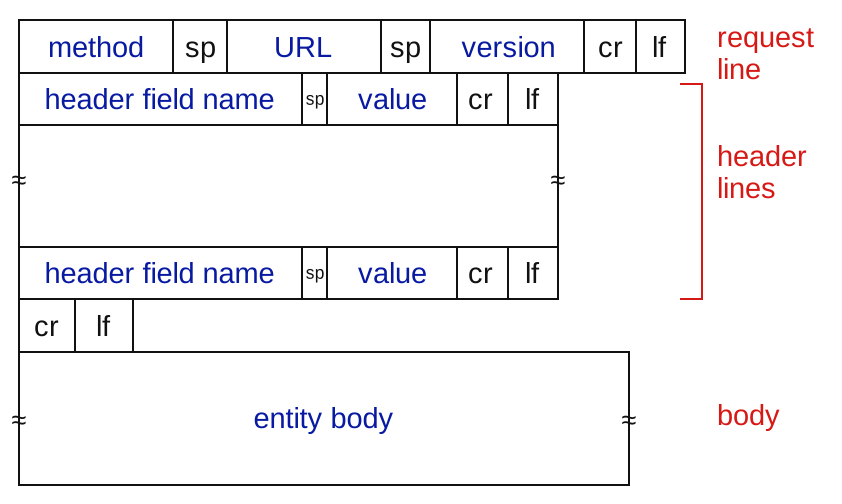
There are multiple possible request messages:
- POST method: web pages often include form inputs, the user’s input is sent from the client to the server in the body of the HTTP POST request message.
- GET method: this is often used (apart from asking for web objects) to send data to a server: in HTML forms the user’s data is included in the URL field of a HTTP GET request message, following a ’?’ (
www.site.com/subdomain?userdata1&userdata2). - HEAD method: this is used to request only the headers, without the requested objects, it is most used during debugging.
- PUT method: this uploads a new object to the server, completely replacing the file that exists at the specified URL with the content in the body of the PUT HTTP request message.
- DELETE method: it allows a user – or an application – to delete an object on a Web Server.
Here are some header field examples for a request message:
- Host: www.someschool.edu
- Agent: Mozilla/5.0
- Accept-language: fr
- Connection: close/keep-alive
HTTP response messages
Let’s now take a look at the structure of HTTP response messages:
HTTP response message general format:
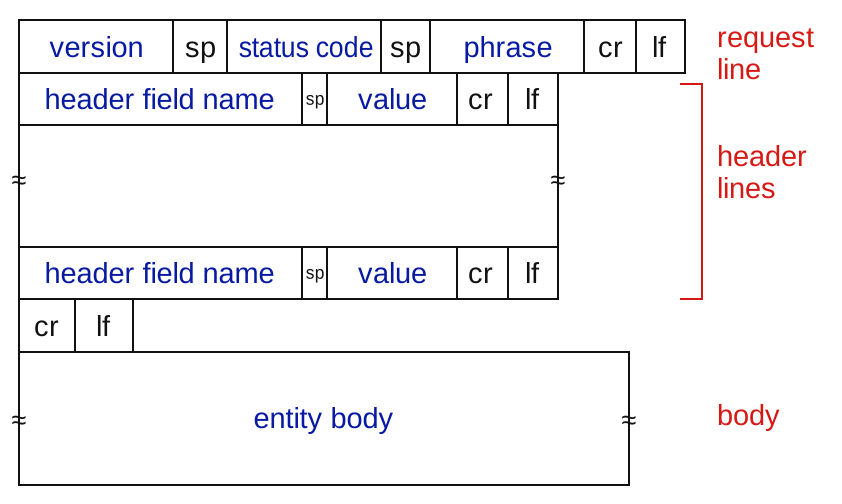
Here are some header field examples for a response message:
- Date: dateAndTimeOfTheResponseMessage
- Server: Apache/2.2.3 (CentOS)
- Last-Modified; critical for object caching
- Content-Length;Number Of Bytes in the Object being sent
- Keep-Alive: timeout=10, max=100
- Connection Keep-Alive/Close
- Content-Type: text/html
2.1.2 Status Codes
The status code appears in the first line in the server-to-client response message together with its associated phrase; there are multiple status codes for HTTP responses:
- 200
Ok: request succeeded, the requested object is included later in this message. - 301
Moved Permanently: the requested object got moved, the new location is specified later in the message within theLocationheader. - 400
Bad Request: request message not understood by the server. - 404
Not Found: the requested document was not found on this server. - 505
HTTP Version Not Supported: the requested HTTP version is not supported by the server.
2.1.3 TELNET
Telnet is a client-server application protocol that provides access to virtual terminals of remote systems on local area networks (LANs) or the Internet.
It is a protocol for bidirectional 8-bit communications. Its main goal was to connect terminal devices and terminal-oriented processes.
Example
telnet <host> <port> : this cli command opens a tcp connection to the specified url and port, then for example:
type: GET <url> HTTP/1.1;
press enter;
type: Host: <host>;
press enter twice to finally send the HTTP request message;
Read the HTTP response from the server;
quit with ^].
2.1.4 Cookies (2.2.4)
Cookies are used by some browsers to maintain some state between transactions (vanilla HTTP is stateless).
The Cookies mechanism can be divided into four components:
- Cookie Header Line in the HTTP response message
- Cookie Header Line in the next HTTP request message
- Cookie File kept on the user’s end system end managed by the browser
- Back-End Database at the Web site
Let’s now analyze how cookies are used by browsers and servers:
- The client makes a simple HTTP request to a server.
- The server creates and ID for the user and creates an entry in the backend database indexed by said ID.
- The server responds and includes a cookie with this new ID in the response message to the client, in the
Set-cookieheader. - The client’s browser sees the cookie and appends the cookie’s ID and the server’s hostname in its cookie file, stored on the client’s computer.
- The next time that same client will make a HTTP request to that same server, it will include this cookie ID in the
Cookieheader line of the request message. - The server receiving this request message with this cookie ID will now be able to identify the client and offer extra functionality bounded to this new kind of statefulness
Cookies have various uses: Authorizations, Shopping Carts, Recommendations, User session state (web e-mail) and plenty more.
- Cookies permit sites to learn (a lot) about you on their site.
- Third party persistent cookies allow common identity to be tracked across multiple web sites.
2.1.5 Web Caches (proxy servers) (2.2.5)
The goal of Web Caches (A.K.A. Proxy Servers) is to satisfy client requests without involving the origin servers, to alleviate the load on these reduce response time and alleviate the load on internet as a whole.
Proxy servers act both as a client and as a server and are typically installed by ISPs. They keep copies of recently requested objects in its persistent storage.
The user configures the browser to point to a web cache, then when the client requests an object from a server:
- if the requested object is in the cache: the cache returns the object to the client.
- if the requested object isn’t in the cache: the latter asks and receives the object from the origin server, caches it and sends it to client.
Problem of recency of cached objects
What do we do if the object is updated on the remote servers and the proxy server isn’t aware?
Conditional GET: don’t send an object if the cache already has an up-to-date version.
The conditional GET works as follows: the proxy server includes the version of the cached object copy in the if-modified-since header when sending the normal GET statement; the server’s response contains no object if the cached copy is up to date (http/1.0 304 Not Modified),otherwise, if the object has been updated, the new version is included in the HTTP response (HTTP/1.0 200 OK <data>).
This way the object is only sent if necessary, keeping stress on the link low.
Note: the date/time in the if-modified-since header is the same included in the Last-modified header in the server’s response.
2.1.6 Important updates
HTTP 1.1
This version introduced multiple pipelined GETs over a single TCP connection.
In this version the scheduling algorithm for GET requests is FCFS: first come first served.
Issue: small objects may wait for bigger (slower) objects (requests) (HOL blocking: Head of line blocking).
Also loss recovery (retransmitting lost TCP segments) stalls object transmission.
HTTP 2
RFC 7540, 2015: The key goal for this version was decreasing delay in multi-object HTTP requests.
Increased the flexibility for servers when sending objects to clients: objects are divided into frames and the frame transmission is interleaved.
Frames are scheduled to mitigate HOL blocking: smaller frames get sent first.
The order of transmission of requested object is now based on client-specified object priority, not necessarily FCFS.
Problems: recovery from packet loss still stalls transmission, also no extra security over vanilla TCP connections.
HTTP 3
The key goal for this version was to decrease delay in multi-object HTTP requests:
Adds:
- security
- per object error (and congestion) control (more pipelining) over UDP
2.2 E-mail, SMTP, IMAP (2.3)
The e-mail infrastructure is made of these three major components:
- user agents: the user reading, composing and editing mail messages
- mail servers: these have a mailbox containing incoming messages for the user and a message queue of outgoing (waiting to be sent) messages
- a mail transfer protocol: for example simple mail transfer protocol (SMTP)
The E-Mail protocol is described in RFC(5321).
It uses TCP to reliably transfer email messages from clients (mail server that initiates the connection) to servers, port 25. It essentially is a direct transfer from the sending server (acting as a client) to the receiving server.
SMTP email messages must be in 7-bit ASCII. Binary multimedia data must be encoded to ASCII before being sent over SMTP, and decoded after.
2.2.1 Sending Emails
This is a command/response interaction, like http:
- commands: ASCII text
- response: status code and phrase
- User composes email
- sends email to his email server
- the client side of the sender’s SMTP server opens a TCP connection with the destination user’s server
- the servers do a SMTP application layer handshake:
- HELO
- FROM
- RCPT TO
- the email is sent over the SMTP connection
- DATA
- the receiving server puts the email in the destination user’s mailbox
- the connection gets closed
- QUIT
- the destination user can access the emails in his mailbox via his email server
2.2.2 Comparing SMTP and HTTP
- HTTP is primarily a pull protocol, whereas SMTP is primarily a push protocol.
- both have ASCII command/response interaction and status codes.
- SMTP requires the message (header and body) to be in 7-bit ASCII, HTTP doesn’t.
- HTTP encapsulates each object in its how HTTP response message, SMTP instead places all of the message’s objects into one message.
2.2.3 Mail message format
The format of e-mail messages is specified in RFC 5321 (defines protocol) and RFC 822 (defines syntax). First comes the message header, then a blank line (CRLF) and finally the message body:
From: user@server
To: user@server
Subject: subject
CRLF
message body in ASCII
2.2.4 Mail access protocols (2.3.4)
A typical user runs a user agent on the local pc but accesses its mailbox stored on an always-on shared email server, shared with other users and typically maintained by the user’s ISP.
SMTP defines delivery and storage of e-mail messages from the sender to the receiver’s server:
the sender’s user agent uses SMTP to push the e-mail message into his mail server. Then SMTP is used again to transfer the e-mail between the sender’s and the receiver’s server. Finally, how does the receiver’s user agent retrieve the messages from the user’s mailbox on the server?
We a mail access protocol like IMAP (Internet mail access protocol, RFC 3501) or POP3 (Post Office Protocol – Version 3).
Mail Access Protocols define how messages are stored on the server and provide retrieval, deletion and organization of stored messages on the mail server.
We can also use HTTP to access web-based interfaces (like gmail, hotmail ecc) that work on top of SMTP (to send e-mails) and IMAP (or POP) (to retrieve e-mails). With this service the user agent is a web browser, ad the user communicates with its remote mailbox via HTTP, notably also when sending messages, not only when retrieving them.
POP: Post Office Protocol
POP3 is an extremely simple MAP (mail access protocol), defined in RFC 1939.
POP3 begins when the user agent begins a TCP connection with the mail server, on port 110.
The server accepts the connection and the protocol now processes through 3 phases:
- authorization: the user agent sends a username and a password (in clear-text) to authenticate the user. To do this the user uses two commands:
user: <username>andpass: <password> - transaction: the user agent retrieves messages and issues commands: marks messages for deletion, removes deletion marks, and obtains mail statistics. Commands:
list,retr,dele,quit - update: this phase occurs after the client has issued the quit command, ending the POP3 session. At this time, the mail server deletes the messages marked for deletion.
A user agent using POP3 can be configured by the user to adhere to one of two modes: download-and-keep and download-and-delete.
In a POP3 transaction, the user agent issues commands, and the server responds to each command with a reply.
There are two possible responses: +OK (sometimes followed by server-to-client data), used by the server to indicate that the previous command was fine; and -ERR, used by the server to indicate that something was wrong with the previous command.
A POP3 server only holds some state in a single session, like the list of marked messages, it does not hold state between sessions, this greatly simplifies the implementation of this protocol.
POP servers also do not offer any kind of message organization functionality (folders ecc).
IMAP
To solve this and other problems, the IMAP protocol, defined in RFC 3501, was invented. Like POP3, IMAP is a mail access protocol. It has many more features than POP3, but it is also significantly more complex.
An IMAP server will associate each message with a folder; when a message first arrives at the server, it is associated with the recipient’s INBOX folder. The recipient can then move the message into a new, user-created folder, read the message, delete the message, and so on. IMAP also provides commands that allow users to search remote folders for messages matching specific criteria.
Another important feature of IMAP is that it has commands that permit a user agent to obtain components of messages. For example, a user agent can obtain just the message header of a message or just one part of a multipart MIME message. This is useful in low-bandwidth situations.
This means that an IMAP server holds state between sessions.
2.3 The Domain Name System (DNS) (2.4)
Problem: internet hosts and routers have both an IP address (IP), used for addressing datagrams, and a “name”, used by humans (like www.google.com).
How do we map between IP address and name, and vice versa?
The Domain Name System (DNS) is a distributed database implemented in a hierarchy of many DNS servers.
It is also an application-layer protocol that allows hosts to query the distributed database.
Registering a subdomain means linking it univocally to an IP address, registering it in the DNS database.
2.3.1 DNS services (2.4.1)
- hostname to IP address translation
- host aliasing: provides alias names for the canonical hostname
- mail server aliasing
- load distribution: replicated web servers: many IP addresses correspond to one name. When a client asks for the resolution for a hostname, the DNS server answers with the whole list of associated IP addresses, but each time in a different order, since the client normally goes for the first in the list.
2.3.2 ICANN
The distributed DNS server is managed by Internet Corporation for Assigned Names and Numbers (ICANN), which defines what the top layer domains* are and accredits the various registrars (read more on registrars below).
2.3.3 DNS structure
The DNS is a distributed, hierarchical database, which can be approximated to these 3 classes of DNS servers:
- ROOT: the client queries the root DNS server to find the IP address of the Top level domain’s DNS server.
- TOP LEVEL DOMAIN: the client queries the top level domain DNS server to find the address of the authoritative DNS server.
- AUTHORITATIVE: the client queries the authoritative DNS server to find the IP address for the desired host.
A distributed structure was chosen because a centralized DNS:
- doesn’t scale
- has a single point of failure (SPF)
- cannot be near every host
- cannot handle that much traffic volume (Comcast DNS servers serve 600B DNS queries per day)
- cannot be easily maintained
ROOT name servers
These servers are the official contact-of-last-resort for name servers that cannot resolve the queried name.
The are 13 logical root name servers worldwide, each server is replicated many times (there are more than 200 root name server in the US alone).
Local DNS name servers
Also called default name servers, these do not strictly belong to the hierarchy of servers and are installed into each ISP and they act as a sort of proxy DNS server, they have a local cache of recent name-to-address translations pairs, BUT it may be out of date!
When a host connects to an ISP, the latter provides the host with the IP addresses of one or more of its local DNS servers, typically through DHCP.
When a host makes a DNS query it is sent to its local DNS server which then queries the main hierarchy.
DNS caching
DNS caching is essential for reducing the load on the DNS servers and the internet as a whole, given the frequency of such requests.
In a query chain when a DNS server receives a DNS reply, it stores the translation in its local memory, then, when it receives a DNS query for that same host, it replies with its stored translation – if it is recent enough – even if it isn’t an authoritative server for that hostname.
Cached translations last for their initial TTL (time-to-live) – which usually is two days – before getting thrashed.
2.3.4 DNS records (2.4.3)
The DNS is a distributed database storing resource records (RR). Each DNS reply contains one or more of these records.
A Resource Record is a 4-tuple that contains these fields: name, value, type, ttl, whose meaning depends on the type of record:
- type=A (address)
- name is a hostname
- value is the associated IP address
- type=NS (name server)
- name is the domain (what you enter in the search bar)
- value is the hostname of the authoritative name server for said domain
- type=CNAME (“canonical name”)
- name is an alias name for some “canonical” name (the real name)
- value is the canonical name for the alias
- type=MX
- value is the name of the mailserver associated with
name
- value is the name of the mailserver associated with
- there are even more types
If a server is authoritative for some hostname, it will contain a type A record for it.
If a server is not authoritative for some hostname, it will contain a type NS record for the domain that includes the hostname and it will also contain a type A record that provides the IP address of the DNS server referenced in the NS record.
2.3.5 DNS protocol messages (2.4.3)
The first 12 bytes of a DNS message are the header section, of which the first 2 bytes are the DNS query ID, this identifier is copied into the reply message to the query, allowing the client to match received replies with sent queries.
| ← 2 bytes → | ← 2 bytes → |
|---|---|
| query ID | flags |
| number of questions | number of answer RRs |
| number of authority RRs | number of additional RRs |
| question RRs (4 bytes) | name and type fields of a query |
| answer RRs (4 bytes) | reply RRs |
| authority RRs (4 bytes) | RRs for authoritative servers |
| additional info (4 bytes) | RRs |
| flags: |
- query (0) or reply (1).
- recursion desired; can be set by both hosts and DNS servers.
- recursion available; set by DNS servers who offer recursion.
- reply is authoritative; set by DNS servers when their reply is authoritative.
nslookup: command-line tool to query the DNS server.
2.3.6 Name resolution Approaches
Iterated Query
The host first asks the local DNS server, which in turn contacts every required DNS server until resolution, the contacted servers reply with the name of the server to contact and the local DNS server executes.
When the local DNS server has resolved the name, it replies to the host with the answer.
This approach is better.
Recursive Query
The host first asks the local DNS server, which in turn contacts the next server (the root), which then asks the next (TLD) eccetera, until resolution.
Every contacted server asks the next, in a chain of queries and answers, until the authoritative server has the answer, at this point every server replies with the answer down the chain, until it arrives to the host.
This leads to more load on the servers, apart from the local DNS servers.
2.3.7 Inserting Names into the DNS
To insert a domain in the DNS, the domain name must be registered at a DNS registrar*.Registrars are commercial entities that verify the uniqueness of the domain name and enter it into the DNS database; Network Solutions had the monopoly of most domains until 1999.
To register a name you must create the primary and secondary authoritative DNS servers locally, provide names and IP addresses of your primary and secondary authoritative name server to the Registrar, who then will inserts NS and A records (RRs) into the TLD (top level domain) servers.
Until recently, DNS records had to be manually configured, now a UPDATE option has been aded to the DNS protocol, to allow data to be dynamically added or deleted from the database via DNS messages.
2.3.8 example of a (iterative) DNS resolution
Requesting host (alice.iet.unipi.it) asks the local DNS server what the IP for www.networkutopia.com is.
Local DNS server contacts the root DNS server, which replies with the IP of the .com DNS server.
Local DNS server now contacts the .com DNS servers, which replies with the IP of the authoritative server for networkutopia.com.
Now the local DNS server contacts the authoritative server, which replies with the information needed, which is now rooted back towards the initial client with finally a reply to the requesting host.
2.3.9 DNS security
DNS servers are susceptible to:
- DDoS bandwidth-flooding attacks, who have not been successful to date
- Redirect attacks:
- man-in-the-middle: intercepting DNS queries and return bogus replies to the hosts
- DNS poisoning: sending false replies to the DNS servers, which then get cached
- exploit of DNS for DDoS: spoofing the source IP address of DNS requests so they appear to come from the victim’s IP. When the DNS servers respond, they send the (much larger amplification) replies to the victim, overwhelming it with traffic.
DNSSEC
Redirect Attacks and Exploit DNS for DDoS are accounted for by DNSSEC (domain name system security extensions), which is a set of extensions that add security to the DNS protocol. This works by signing with crypted signatures the DNS records. This guarantees the authenticity and integrity of the replies.
3 Peer-to-Peer File Distribution (2.5)
Every peer looks more like a powerful client from the 1.1.1 Client-Server paradigm, technically every peer is on the same level.
The availability of resources this way is not guaranteed from a powerful server, but from the sheer number of peers self scalability.
There isn’t an always on server.
End systems arbitrarily communicate with each other.
Peers request service from other peers, providing service to other peers in return.
Indexes are needed for mapping information to the right host locations.
3.1 Content Indexes
Indexes are needed for mapping information to the right host locations.
A content index is a Database with (key,value) pairs.
- key is the content type
- value is the IP address
The peers query the database with the key and the database replies with values that match the key.
Peers can also insert pairs.
3.1.1 Centralized Index
This is a service provided by a server (or a server farm).
When a user becomes active, the application notifies the index with its IP address and a list of available files.
The files are distributed by peers, but the search is client-server style: Hybrid Approach
Drawbacks:
- single point of failure
- performance bottleneck
- copyright problems
This is the system used by Napster, a P2P system for music sharing.
3.1.2 Query Flooding
This is a completely decentralized approach.
When searching for one item, a peer starts querying other peers, which in turn contact other “neighbors” (flooding), until one sends the item to the original peer searching for it.
The file download is done from a single peer.
Limited-scope query flooding: query flooding with a predetermined, limited number of hops (scope).
- it reduces the query traffic and therefore congestion.
- but decreases the probability to locate the content.
- limited-scope: the query flooding stop at a certain “level” of subquery (for example each query starts with , the peers receiving it decrement it and sends it over and again, until )
It is possible to plot a Overlay Network: a graph formed of all active peers as nodes and the TCP connection among them as edges.
This system was used in the original Gnutella version (LimeWire).
3.1.3 Hierarchical Overlay
This approach is a middle ground between centralized and completely decentralized.
Not all peers are equal, Super Nodes (SN) exist, these are peers with high bandwidth and high availability.
SN have local indexes: peers inform their SN about content they have available, and SNs form an SN overlay net.
Peers ask their local SN where they can find an item, SN responds with the IP of the peer with the item, or, if the item is not in the local index, the SN asks other SNs, until the item is found.
Again the file download is done from a single peer.
Used in modern Gnutella.
3.1.4 Distributed Hash Table (DHT)
non serve saperlo per l’esame
This is a distributed P2P database.
Used in BitTorrent.
3.2 How much time does it take to distribute one file to N peers?
time to distribute in client-server approach:
the first component scales linearly with .
time to distribute in peer-to-peer approach:
if we suppose , we have .
So client-server scales linearly with , and instead peer-to-peer tends to a limited number.
3.3 BitTorrent
The file that needs to be transferred gets divide into 256KB chunks, and the peers in the torrent send and receive these chunks.
Torrent: group of peers participating in the distribution of a particular file.
tracker: node that tracks peers participating in the torrent.
Torrent Server: server that knows the IPs of the trackers.
Peers may discover other peers by trackers, DHT (distributed hash table), or PEX (peer exchange).
Chunks don’t even get transferred sequentially, every chunk has an ID so the entire file gets rebuilt by the asking peer once every chunk has arrived.
While a peer is downloading chunks it also uploads already downloaded chunks, then, when it has every chunk, it may leave or remain in the torrent to aid other peers.
3.3.1 Entering a Torrent
- Alice contacts the torrent Server and gets the IP of the tracker.
- Alice contacts the tracker and asks to be included in the torrent.
- The tracker adds Alice to the list of peers participating to the torrent and then sends the list to Alice.
- Alice tries to open concurrent TCP connections with every peer in the list.
- Alice manages to open TCP connections with only a subset of the torrent list, the peers she manages to connect with are called neighboring peers. Peers are divided in leeches (ones who don’t have a complete copy of the file), seeders (ones who have every chunk) and free-riders (who only want to download the file, not seed the file).
- Alice asks now her neighbors what chunks they have.
- Alice asks first for the rarer chunks, the ones that are scarse in the “neighborhood”. This approach is called rarest first.
- Now that Alice has some chunks, other neighbors ask her for chunks, she now has to choose which neighbors to send the chunks to. She now adopts the tit for tat approach, she starts with sending the data to the 4 neighbors sending her chunks at the highest rate (these peers get unchoked). Alice re-evaluates the top 4 peers every 10 seconds. Note that choked peers (every not-unchoked peer) do not get any chunks from Alice.
- Every 30 seconds Alice randomly selects another peer for sending to: she “optimistically unchokes” this peer, who may also join the top 4.
This method of distribution has the effect of pairing peers with similar bandwidth capability and limiting freeriders.
4 Video streaming and content distribution networks (2.6)
The video stream traffic is the major consumer of internet bandwidth.
Content Distribution services are responsible for 80% of residential ISP traffic (data from 2020).
4.1 Multimedia Basics
An image is an array of pixels, where each pixel is represented by bits.
A video is a sequence of images displayed at a constant rate (framerate), normally 24,25 or 30 images per second.
4.1.1 Coding
We can use redundancy within and between video frames to decrease the number of bits used to encode the image.
- spatial coding: instead of sending values of the same color, just send the color and the number if times it repeats ().
- temporal coding: instead of sending the complete frame, just send the differences from the frame
Also video encoding rate can be: CBR (constant bit rate) and VRB (variable bit rate): the video encoding rate changes as the amount of spatial and temporal coding changes
Examples of compression standards:
- MPEG1 (CD-ROM): 1.5 Mbps
- MPEG2 (DVD): 3-6 Mbps
- MPEG4 (often used in internet): 64Kbps - 12 Mbps
NOT to be confused with “MPEG4 part 14”, aka “MP4”, which is a container format.
MPEG stands for Moving Picture Experts Group, a collection of standards developed by ISO/IEC for audio and video coding.
Note: coding and encoding here are synonyms.
4.2 Challenges of streaming
Server-to-client bandwidth, packet loss and delay vary over time. Also we must respect the continuous playout constraint: once the client’s playout begins, playback must match the original timing.
In an ideal world the servers send one frame every 1/30th of a second, the user receives one frame at the same interval, with a fixed network delay, and displays the frames at the correct framerate.
But Network delay is variable! Solution: clients stores the received frames (client-side buffering) and display them at the correct framerate with a client playout delay.
4.3 Compression
An important characteristic of video is that it can be compressed, trading quality with lower file sizes. Today we have algorithms that can compress videos to any desired bit-rate, the higher the bitrate the higher the quality and the overall user viewing experience.
Compressed video typically ranges between 100 Kbps to over 10 Mbps for 4k streaming. This amounts to a huge amount of traffic and storage: a single 2 Mbps video of a duration of 67 minutes will consume 1 GB of storage and traffic ().
In order to provide continuous playout, the network must provide an average end-to-end throughput to the streaming application that is at least as large as the desired bitrate for the video.
We can use compression to create and store the same video at different bitrates, so that the streaming application (user) can choose which one to request based on the internet throughput it knows it can achieve.
4.4 HTTP streaming (2.6.2)
The video is simply stored at an HTTP server as an ordinary file with its URL. When an user wants that video, it establishes a TCP connection with the server and issues an HTTP GET request for that URL.
The server then sends the video file within an HTTP response message, as quickly as the network allows.
On the client side the bytes are buffered, once the number of collected bytes achieves a predetermined threshold, the client application begins playback:
the streaming application gets the bytes from the streaming buffer, decompresses them into frames, and plays them back at the right framerate on the user’s screen, all while continuing to receive new information (the video) from the server.
This way of streaming has worked well but it has a shortcoming: every user receives the same video, independently from its network capability.
4.4.1 Dynamic Adaptive Streaming over HTTP (DASH) (2.6.2)
In DASH the video gets stored on the server at different bitrates (every version is a different file so it has a different URL), the streaming application dynamically chooses chunks of a few seconds of the video in whatever bitrates it deems adequate as a function of user connection bandwidth.
The HTTP server has a manifest file, which provides an URL for each version of the video along with its bitrate.
- The client requests the manifest file
- the client requests a chunk of the video at a desired bitrate
- while downloading the chunk the client measures the received bandwidth and runs a rate determination algorithm to select the chunk to request next.
4.5 Content Distribution Networks (CDNs) (2.6.3)
When content providers choose how to deliver content to millions of users the simplest approach would be to just build a single capable server, but this has many drawbacks (single point of failure, inefficiency – popular media sent many times over the same network, congestion eccetera), thereby the applied strategy is to build servers all around the world, that sort of act like proxies, in which they store the most requested files in their area of operation.
The user asks the generale server where it can find the file and the server redirects it to a server near the client which has that piece of media stored. If there is no such server near the client, CDNs utilize the PULL approach: the main server will quickly send the media to one of the servers accessible by the client, who will then download the file from the latter. When a server is full it removes the less frequently requested files.
There are two different server placement philosophies:
- Enter deep: building many servers and incorporate them near access ISPs, improving user perceived delay and overall user experience.
- Bring home: building less servers and employing them near IXPs. This results in lower maintenance needed compared to “enter deep”, but higher average latency and more congestion.
4.5.1 CDN modus operandi
Let’s now analyze a common way – using DNS – in which CDNs intercept user’s requests for content they provide, choose a cluster and a server from said cluster from which the user should pull the content:
- The user visits a web page from a content provider.
- The user clicks on a link identifying a piece of content resulting in the user’s host sending a DNS query for the subdomain of said file.
- The user’s local DNS server (LDNS) relays the query to an authoritative server for the requested domain, which – observing the subdomain indicating a piece of content – returns a hostname in the domain of the CDN.
- The LDNS sends a second query, this time for the hostname in the CDN’s domain, getting the IP address for the server that will provide the piece of content. Here the CDN’s DNS servers determine the best fitting node for that exact client and reply with its IP address.
- The LDNS replies to the user’s host with the IP of the content-serving CDN node.
- The client’s host now initiates a TCP connection to said CDN node and issues an HTTP GET request for the piece of content it has been searching. If DASH is used the server will first send the manifest of the video and the client will dynamically select chunks from the differently compressed versions listed in the manifest.
4.5.2 Cluster Selection Strategies
When the CDN learns the IP address of the client’s LDNS server via the client’s DNS lookup, with this info it can choose the best fitting CDN node to serve the request.
One cluster selection strategy is to simply choose the CDN node geographically closest to the client (assuming the latter is located near the LDNS).
A more complete strategy is to perform periodic real-time measurements of delay and loss between their clusters and clients, for example by having each cluster periodically send probes to all of the LDNS servers around the world. One drawback is that many LDNS servers are configured to ignore such probes.
4.5.2 Netflix Case Study
Information regarding Netflix account is stored on the Netflix registration and accounting servers. The user browses the Netflix catalog, which is stored on Amazon cloud. These Amazon cloud servers upload copies of the multiple versions of these videos to the DASH CDN servers.
When the user asks the Amazon cloud servers for a piece of content, the servers return the manifest file for it, at this point the user’s machine contacts the correct DASH CDN server and the streaming begins.