uni
Dalla versione 2 è cambiata l’API.
ndarray:
Oggetto che gestisce array di n dimensioni, dati dello stesso tipo.
Tabella indicizzata da una tupla di interi non negativi.
In numpy le dimensioni sono chiamate assi.
import numpy as np
arr = np.array([1,2,3,4,5], [...], ...)

#indicizzazione
arr[1,4]

arr[2] # tutta la terza riga

arr[:,2] # tutti gli elementi della terza colonna (terzo elem. di ogni colonna)

arr[:,::2] # una colonna ogni due
arr[::2,::3] # un elemento ogni due di una colonna ogni 3
Le funzioni universali sono funzioni applicate elemento per elemento
Axis
Per la maggior parte delle operazioni che lavorano su tensori è possibile scegliere su quale asse lavorare:
- None: va a diritto
- 0: va lungo colonne
- 1: va lungo righe
Shapes
print(arr.shape)

arr.reshape(2,3,2)
Flattening
È possibile appiattire una matrice a vettore:
arr = np.array([..],[..])
vect = array.flatten() # crea una copia

raveled = array.ravel() # Ravel ritorna una view quando possibile, non creando una copia
Array numpy vs python
l’append() in python è O(1), in numpy invece è O(N). È però più veloce in operazioni vettorizzabili ed occupa molto meno spazio.
Iterating numpy arrays
Iterare su più dimensione, con enumerate() è lento perché c’è una conversione ai tipi di python.
Operazioni condizionali
Una array può essere indicizzata usando maschere binarie che specificano quali indici usare.
m = np.array([20,5,30,40])
m<25
>>> array([True, True, False, False])
m[m<25]
>>> array([20,5]) # sottovista, non copia
Fancy Indexing
arr = np.arange(10)

indices = [1,3,5,7]
selected = arr[indices]


arr_2d = np.arange(16).reshape(4, 4)
print(arr_2d)
"""
   [[ 0 1 2 3]
	[ 4 5 6 7]
	[ 8 9 10 11]
	[12 13 14 15]]
"""

# Select specific rows and columns
rows = [0, 2, 3]
cols = [1, 2]
print(arr_2d[rows][:, cols])
"""
[[ 1 2]
[ 9 10]
[13 14]]
"""
Views
Le viste non memorizzano dati e modificano l’array originale.
Zeros, Ones
# Create a one-dimensional array of zeros
zeros_1d = np.zeros(5)
print("1D array of zeros:")
print(zeros_1d) # Output: [0. 0. 0. 0. 0.]
# Create a two-dimensional array of zeros
zeros_2d = np.zeros((3, 4))
print("\n2D array of zeros:")
print(zeros_2d)
"""
Output:
[[0. 0. 0. 0.]
[0. 0. 0. 0.]
[0. 0. 0. 0.]]
"""

# You can also specify the data type
zeros_int = np.zeros(5, dtype=int)
print("\nArray of zeros with integer type:")
print(zeros_int) # Output: [0 0 0 0 0]
Full, Identity
# Create an array filled with a specific value
full_array = np.full((2, 3), 7)
"""
[[7 7 7]
[7 7 7]]
"""
# Create a 3x3 identity matrix
id_matrix = np.identity(3)
"""
[[1. 0. 0.]
[0. 1. 0.]
[0. 0. 1.]]
"""

# Create a matrix with ones on the first
# diagonal above the main diagonal
eye_offset = np.eye(3, k=1)
"""
[[0. 1. 0.]
[0. 0. 1.]
[0. 0. 0.]]
"""
Arange, Linspace
Arange crea array con valori spaziati con un dato intervallo, simile a range().
# Negative step
arr4 = np.arange(10, 0,
-1)
print(arr4) # Output: [10 9 8 7 6 5 4 3 2 1]
# Using float step
arr5 = np.arange(0, 2, 0.3)
print(arr5) # Output: [0. 0.3 0.6 0.9 1.2 1.5 1.8]
Linspace include l’estremo superiore di default e chiede che si indichi il numero di punti in cui dividere, invece dell’incremento.
# You can get the step size along with the array
arr3, step = np.linspace(2, 3, 5, retstep=True)
print(f"Array: {arr3}")
print(f"Step size: {step}")
"""
Array: [2. 2.25 2.5 2.75 3. ]
Step size: 0.25
"""
Data types
z = np.arange(3, dtype=np.uint8)
# array([0, 1, 2], dtype=uint8)

# Can also be referred by code
z = np.array([1, 2, 3], dtype='f')
# array([1., 2., 3.], dtype=float32)

# Use function astype to convert
z.astype(np.float64)
# array([0., 1., 2.])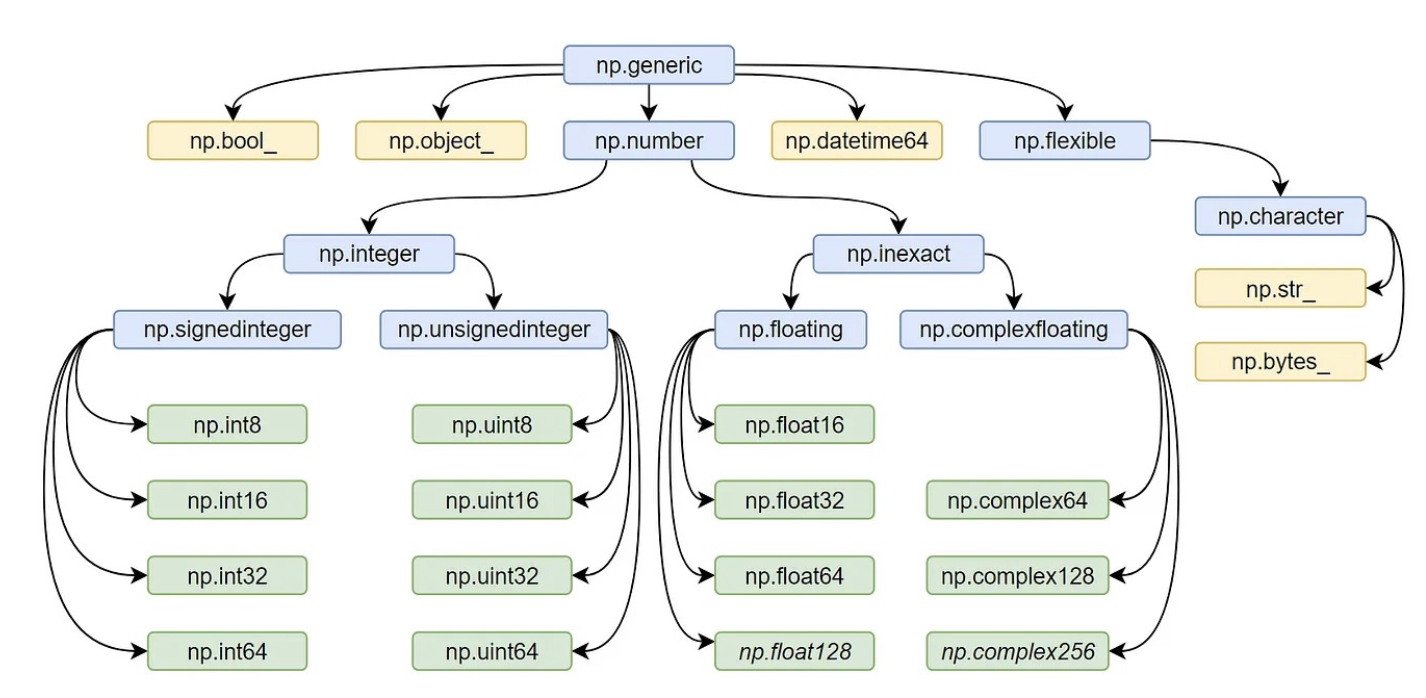
Random
# Set random seed for reproducibility
np.random.seed(42)

# Generate a single random float between 0 and 1
rand_float = np.random.rand()
# 0.37454011884736246

# Generate an array of random floats between 0 and 1
rand_array = np.random.rand(3, 2)
# [[0.95071431 0.73199394]
# [0.59865848 0.15601864]
# [0.15599452 0.05808361]]

# Generate random integers from a range
rand_ints = np.random.randint(1, 100, size=(2, 3))
# [[95 96 32]
# [35 39 87]]

# Generate random samples from a normal (Gaussian) distribution
gaussian_samples = np.random.normal(loc=0, scale=1, size=5)
print("\nSamples from normal distribution (mean=0, std=1):")
print(gaussian_samples)

# Randomly shuffle an array
arr = np.arange(10)
np.random.shuffle(arr)
print("\nShuffled array:")
print(arr)
Saving and Loading
# Create an array
arr = np.array([[1, 2, 3], [4, 5, 6]])

# Save to binary file (.npy format)
np.save('array_data.npy', arr)

# Load the array
loaded_arr = np.load('array_data.npy')
print(loaded_arr)
"""
[[1 2 3]
[4 5 6]]
"""

# Save multiple arrays to a single file (.npz format)
arr1 = np.array([1, 2, 3])
arr2 = np.array([4, 5, 6])
np.savez('multiple_arrays.npz', a=arr1, b=arr2)

# Load multiple arrays
loaded_data = np.load('multiple_arrays.npz')
print(loaded_data['a']) # [1 2 3]
print(loaded_data['b']) # [4 5 6]
CSV handling
# Create an array
arr = np.array([[1, 2, 3], [4, 5, 6]])

# Save to text file
np.savetxt('array_data.csv', arr, delimiter=',')

# Load from text file
loaded_arr = np.loadtxt('array_data.csv', delimiter=',')
print(loaded_arr)
"""
[[1. 2. 3.]
[4. 5. 6.]]
"""
Matrix manipulation
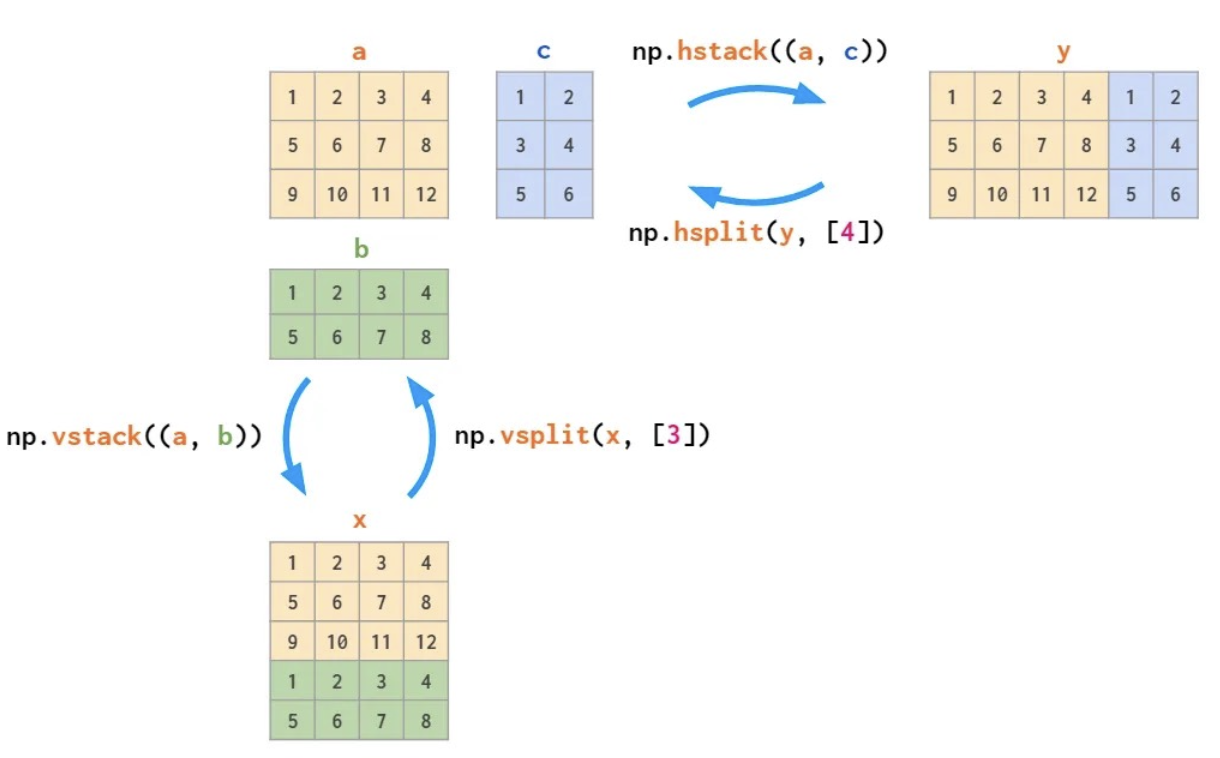
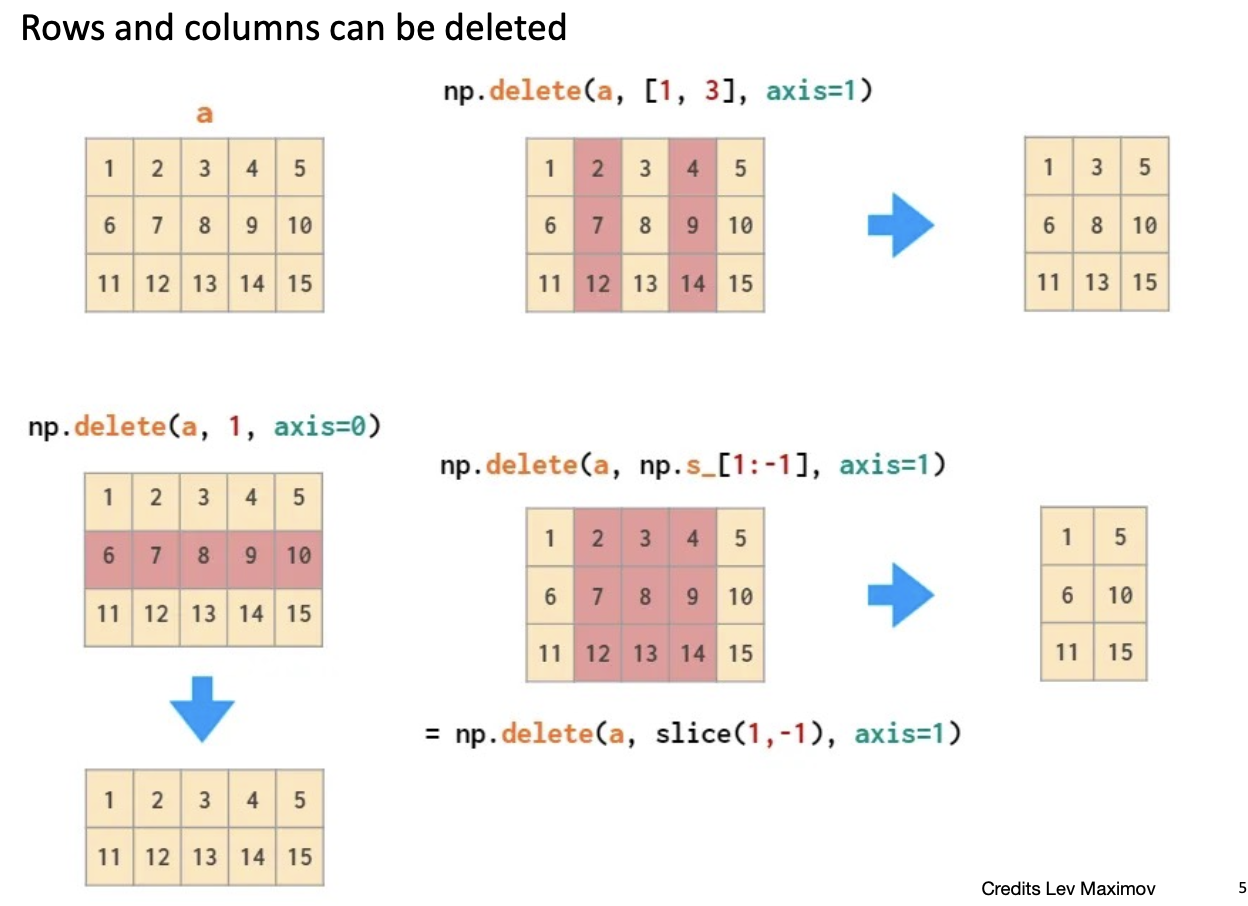
e c’è anche np.insert().
Algebra
Norm
Norma 2:
def norma(vector):
	squares = [element**2 for element in vector]
	return sum(squares)**0.5
Prodotto scalare
np.dot(x,y)
x.dot(y)
Matrix Multiplication
# Matrix multiplication
m1 = np.array([[1, 2], [3, 4]])
m2 = np.array([[5, 6], [7, 8]])
matrix_product = np.matmul(m1, m2)
print(matrix_product)
"""
[[19 22]
[43 50]]
"""

# Alternative matrix multiplication notation
# (python 3.5+)
matrix_product_alt = m1 @ m2
Trasposta
Restituisce una vista della matrice trasposta:
trasposta = arr.T

# su dimensioni maggiori:
arr = np.arange(24).reshape(2,3,4)
# traspose axes in different orders
transposed = np.transpose(arr, (1,0,2))
Inversa
A = np.array([[1, 2], [3, 4]])

# Matrix inverse
inv_A = np.linalg.inv(A)
print("Inverse of A:")
print(inv_A)
"""
[[-2. 1. ]
[ 1.5 -0.5]]
"""
Funzioni degne di nota
# Eigenvalues and eigenvectors
eigenvalues, eigenvectors = np.linalg.eig(A)
print("Eigenvalues:", eigenvalues)
print("Eigenvectors:")
print(eigenvectors)
# Solve linear system Ax = b
b = np.array([1, 2])
x = np.linalg.solve(A, b)
print("Solution to Ax = b:", x)
Statistica
# Create an array
arr = np.array([1, 2, 3, 4, 5, 6, 7, 8, 9, 10])

# Basic statistics
print(f"Mean: {np.mean(arr)}")
print(f"Median: {np.median(arr)}")
print(f"Standard deviation: {np.std(arr)}")
print(f"Variance: {np.var(arr)}")
print(f"Min: {np.min(arr)}, Max: {np.max(arr)}")

# Percentiles
print(f"25th percentile: {np.percentile(arr, 25)}")
print(f"75th percentile: {np.percentile(arr, 75)}")

# For 2D arrays
arr_2d = np.array([[1, 2, 3], [4, 5, 6], [7, 8, 9]])
print("Mean along rows:", np.mean(arr_2d, axis=1))
print("Mean along columns:", np.mean(arr_2d, axis=0))